DecompHub
进度徽章与报告
在 README 中展示多个有来源依据的进度指标。
将这段 Markdown 复制到 README
[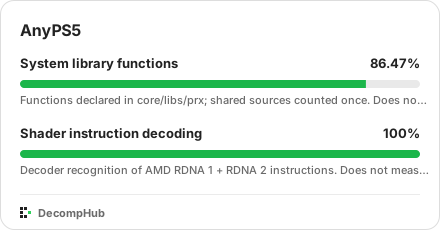](https://app.decomphub.com/projects/anyps5#progress)徽章展示最近保存的报告,可能缓存几分钟。点击可查看日期和原始来源。导入的标签保留原文。

发布进度报告
在 README 中链接到 decomphub.progress.json。每个指标都应有固定 ID、明确的测量范围和测量值。进度未知时使用 null。代码匹配、着色器解码和兼容性应分别记录。
结构示例:请替换为自己的仓库和测量范围。不预设任何百分比。
{
  "format": "decomphub.progress/v1",
  "repository": "https://github.com/boykopovar/anyps5",
  "tracks": [
    {
      "id": "matching-code",
      "label": "Matching code",
      "scope": "Target version and measurement boundary",
      "measurement": null
    }
  ]
}
在 README 中添加此报告链接
[Progress data](decomphub.progress.json)每项测量保留来源与范围。日期为可选项;未提供时显示读取来源的时间。不同指标不会被合并计算平均值。
合并后更新
更改进入默认分支后,在 CI 中生成并发布报告,再添加此通知。现有任务会遵守服务商限制,每个项目每小时最多读取一次来源。通知不会提供百分比。定期采集也会继续。
- name: Notify DecompHub
  env:
    PROJECT_REPOSITORY: https://github.com/${{ github.repository }}
    PROJECT_REVISION: ${{ github.sha }}
  run: |
    jq -n --arg repository "$PROJECT_REPOSITORY" --arg revision "$PROJECT_REVISION" \
      '{repository: $repository, revision: $revision}' |
      curl --fail --silent --show-error --max-time 20 \
        -H "Content-Type: application/json" --data-binary @- \
        https://app.decomphub.com/api/progress/refresh